Connectivity for High Availability
A Namespace with High Availability features spans two regions, and the endpoint your Workers and Clients connect through determines how they behave before, during, and after a failover. This page covers:
- How to choose between the Namespace Endpoint and a Regional Endpoint for a Namespace with High Availability features.
- How to configure PrivateLink so that failover remains transparent to Workers on private networks.
How to choose an endpoint for a Namespace with High Availability features
Temporal Cloud exposes two kinds of gRPC endpoints for a Namespace. See How to access a Namespace for the general definitions; this section focuses on how each behaves with replication and failover.
Namespace Endpoint (recommended)
Format: <namespace>.<account>.tmprl.cloud:7233
The Namespace Endpoint always connects to whichever region is currently active. Under the hood, it is a CNAME that points at the active region's Regional Endpoint. When Temporal Cloud fails the Namespace over, it updates the CNAME to point at the new active region. The DNS TTL is 15 seconds, so Clients converge within about 30 seconds with no configuration change on your side. For private connections, this behavior depends on your DNS configuration and provider; GCP Private Service Connect does not support automatic failover through Temporal Cloud DNS.
Use the Namespace Endpoint unless you have a specific reason to pin traffic to a region.
Regional Endpoint
Format: <cloud>-<region>.region.tmprl.cloud:7233 (for example, aws-us-west-2.region.tmprl.cloud or gcp-us-central1.region.tmprl.cloud).
See regions for the full list.
A Regional Endpoint is shared across every Namespace that is active or replicated in that region. Unlike the Namespace Endpoint, a Regional Endpoint stays pinned to the region in its name — if that region holds the passive replica of your Namespace, the Regional Endpoint connects to the passive replica.
Use a Regional Endpoint only when you need explicit control over which replica a Client or Worker reaches.
Trade-offs to consider:
- Faster recovery. A Worker connecting through a Regional Endpoint skips the DNS step that Clients on the Namespace Endpoint wait for during a failover. This removes the ~30-second DNS convergence window from the recovery path, which is useful for Workloads that must minimize Recovery Time at all costs.
- You are responsible for regional coverage. A Worker using the Regional Endpoint of a region cannot reach the Namespace if that region is in an outage. To stay available through a failover, you must run Workers that use the replica region's Regional Endpoint — Workers pointed only at the outage region's Regional Endpoint will not reconnect automatically.
When authenticating with mTLS, set the Client's server_name / serverNameOverride config equal to the Namespace Endpoint.
This overrides the SNI that the Client will expect during the TLS Handshake with Temporal Cloud.
The Regional Endpoint forwards the request to your Namespace, so the Client must expect the Namespace's certificate during the TLS handshake.
For example, in TypeScript, the Client's config would be set like this:
await Connection.connect({
  address: 'aws-us-east-1.region.tmprl.cloud:7233',
  tls: {
    serverNameOverride: 'my-namespace.my-account.tmprl.cloud',
    clientCertPair: { crt: clientCert, key: clientKey },
  },
  ...
});
How endpoints route on failover
Consider a Namespace replicated across us-east-1 (initially active) and us-west-2 (initially the replica), with a failover that swaps the two.
| Client connects via | Before failover | After failover |
|---|---|---|
| Namespace Endpoint | us-east-1 | us-west-2 (automatic) |
Regional Endpoint aws-us-east-1.region... | us-east-1 | us-east-1 |
Regional Endpoint aws-us-west-2.region... | us-west-2 | us-west-2 |
The Namespace Endpoint moves with the active region via an updated CNAME — no Client changes required. The Regional Endpoints do not change their targets on failover: each continues to route to the replica that lives in its region.
How requests reach the replica
A request can reach the passive replica in three ways:
-
Through the passive region's Regional Endpoint. A Regional Endpoint is pinned to its region, so the Regional Endpoint of the region that currently holds the passive replica connects to the passive replica.
-
Through a PrivateLink or Private Service Connect endpoint in the passive region. A VPC Endpoint or PSC endpoint in the passive region routes to the passive replica.
-
Through the Namespace Endpoint during a failover. When a Namespace fails over, two things happen in parallel:
- The replica becomes active, and the former active becomes a replica.
- The Namespace Endpoint changes to point at the replica's region, and the Worker re-resolves the Namespace Endpoint to connect to the new active region via DNS.
If #1 completes before #2, a Worker that was connected to the former active before the failover will stay connected to it even after it becomes the replica. The Worker will change to point at the new active when the DNS changes propagate and the Client re-resolves DNS (typically 30 seconds, though up to 5 minutes, bounded by Temporal Cloud's maximum connection lifetime).
By default, Temporal Cloud transparently forwards any request that reaches the passive replica to the active region, and the response back. You can turn forwarding off for Worker polls, but Client requests such as Start Workflow, Signal, and Query are always forwarded.
To learn what forwarding does, see Request forwarding.
To stop forwarding Worker polls on a Namespace, see Change the forwarding behavior.
To run Worker fleets in both regions that rely on this forwarding, see Active/Active.
To keep passive-region Workers on standby until failover by disabling this forwarding, see Active/Hot-Passive.
How to use PrivateLink with High Availability features
Proper networking configuration is required for failover to be transparent to Clients and Workers when using PrivateLink. This section describes how to configure routing for Namespaces with High Availability features on AWS PrivateLink.
The regional DNS override pattern below applies to AWS PrivateLink only. GCP Cloud DNS cannot combine public and private DNS resolution in the way this pattern requires, so it does not provide automatic failover with GCP Private Service Connect, including for GCP-only HA. See GCP PSC failover options and multi-cloud connectivity options.
These instructions assume you already have the AWS private connections in place. If not, follow the AWS PrivateLink creation guide first.
How HA + private connectivity works
A Namespace with High Availability features has two replicas — a primary and a secondary, in different regions or different cloud providers. At any moment, one is active and one is passive. On failover, Temporal Cloud changes the active replica.
Temporal Cloud expresses the active replica through DNS:
- The Namespace DNS record (
<ns>.<account>.tmprl.cloud) is a CNAME. - It points to the active region's regional record (
<provider>-<region>.region.tmprl.cloud). - On failover, Temporal Cloud rewrites the CNAME target.
Namespace DNS records have a 15-second TTL. Clients should converge to the new region within roughly 30 seconds (about twice the TTL) once their resolver cache expires.
This is the only place in Temporal Cloud where you can depend on Temporal-managed DNS to behave in a specific, deterministic way — a Namespace Endpoint on an HA Namespace CNAMEing to its active region's regional record. Everywhere else, take a dependency on Temporal's published endpoints (the hostnames themselves), not on what they resolve to. The underlying IP addresses, CNAME chains, and resolution behavior of non-HA endpoints can change at any time without notice.
For AWS PrivateLink, your job is to make sure that:
- Override the Regional Endpoint's DNS zone to resolve to a VPC Endpoint.
- Ensure network connectivity between the two regions.
For HA Namespaces, the PHZ must override only the regional records (<provider>-<region>.region.tmprl.cloud) — never the Namespace Endpoint itself (<ns>.<account>.tmprl.cloud).
If the PHZ holds a record for the Namespace Endpoint, the resolver answers from the PHZ before consulting public DNS, so Temporal Cloud's active-region CNAME is never followed. On failover, Workers keep resolving to the old (now passive) region's VPC Endpoint and never reach the new active region.
This matters most when enabling HA on a Namespace that previously used the single-region PHZ pattern, where the Namespace Endpoint itself was the overridden name. See How to enable HA on a Namespace using Private Connectivity below for the migration steps.
If you attach a public Connectivity Rule with Stable IPs to a Namespace, the Namespace Endpoint resolves to a public Stable IP instead of to <provider>-<region>.region.tmprl.cloud. Stable IPs DNS behavior supersedes the regional DNS behavior described here, so the Namespace Endpoint's DNS resolution will not work in the way the Private Hosted Zone needs. To keep HA + Private Connectivity working, do not attach a Stable IPs public Connectivity Rule to that Namespace.
How to enable HA on a Namespace using Private Connectivity: changing private DNS overrides from single-region to multi-region
These steps apply to AWS PrivateLink only. For GCP Private Service Connect, use the GCP PSC failover options instead; regional DNS overrides do not enable automatic failover.
If you are turning on High Availability features on a Namespace that already uses AWS PrivateLink, the existing private DNS setup almost certainly needs to change before DNS-based failover will work.
The common single-region private DNS pattern (described in the AWS PrivateLink guide) overrides the Namespace Endpoint directly. That pattern short-circuits Temporal Cloud's regional CNAME and prevents DNS-based failover from working — see the warning above.
Follow these steps in order to update your private DNS overrides without interrupting traffic:
-
Inventory the existing PHZ records. List the records in your private hosted zone for
tmprl.cloud. Note any CNAME (or A record) for<ns>.<account>.tmprl.cloud— that is the single-region override you'll be removing. -
Add regional records for both the source and target HA regions. Before removing anything, create:
aws-<source-region>.region.tmprl.cloud→ source-region VPC Endpointaws-<target-region>.region.tmprl.cloud→ target-region VPC Endpoint
These records are additive and do not yet affect resolution of
<ns>.<account>.tmprl.cloud, because the Namespace-endpoint override still short-circuits the chain. -
Confirm both VPC Endpoints are reachable from your Worker VPCs. From a Worker host,
digthe new regional names and confirm they resolve to the right VPC Endpoint. Also verify the network path actually works in both regions (security groups, route tables, cross-region connectivity). -
Enable HA on the Namespace. Follow Enable High Availability features. Temporal Cloud creates the replica and starts replicating.
-
Remove the Namespace-endpoint PHZ record. Delete the
<ns>.<account>.tmprl.cloudrecord from the PHZ. With it gone, Workers resolve the name through public DNS → regional CNAME → PHZ regional override → VPC Endpoint, which is the correct HA chain. Do not skip this step. If the Namespace-endpoint override remains, failover does not work. -
Test failover end-to-end. Trigger a manual failover in a staging environment to confirm Workers converge to the new active region within the expected window (about 30 seconds after the public CNAME update, given the 15-second TTL).
Adding the regional records first (step 2) and removing the Namespace-endpoint record last (step 5) means Workers always have a working DNS resolution. Reversing the order leaves a window where Workers cannot resolve the Namespace Endpoint at all.
To reverse this change when you disable HA, change private DNS back to the single-region setup before removing the replica.
How to migrate to another Temporal Cloud Region when using Private Connectivity
To move a Namespace to a new Temporal Cloud Region while keeping Private Connectivity in place, the recommended pattern is to use a separate private hosted zone in each region, each overriding the Namespace Endpoint to point at that region's own VPC Endpoint. Because a PHZ is scoped only to the VPCs it is associated with, Workers in each region resolve the Namespace Endpoint to their local VPC Endpoint and traffic stays in-region throughout the move.
This is not the only way to handle a region change with Private Connectivity, but it is the most commonly used.
Before creating a GCP Namespace or adding a GCP replica, check GCP capacity restriction for regional availability and exception requirements.
Steps:
-
Keep the existing Namespace Endpoint PHZ override in the original region. Do not change anything in the original region's private DNS setup yet.
-
Create a new VPC Endpoint in the new region. Follow the AWS PrivateLink (or GCP PSC) creation steps in the new region's VPC.
-
In the new region, create a PHZ that overrides the Namespace Endpoint to point at the new VPC Endpoint. Use the single-region PHZ pattern, scoped only to the new region's Worker VPCs. With one PHZ per region, traffic in each region routes through that region's own VPC Endpoint.
-
Add a replica in the new region. Follow Enable High Availability features. The new region comes up as a passive replica.
-
Start Workers in the new region. They begin processing tasks immediately, even though they are connecting to the passive replica, because Temporal Cloud forwards Workflow and Activity tasks across regions transparently. This is what keeps the region change zero-downtime.
-
Failover to the new region. Trigger a manual failover to make the new region active. Workers in the old region keep running and keep using the old VPC Endpoint — they now connect to the passive replica that lives in the old region, and Temporal Cloud forwards their tasks to the new active region.
-
Drain and remove Workers and the VPC Endpoint in the old region. Once you are confident the new region is handling all new work and you no longer need old-region Workers, stop them. Complete the replica-removal connectivity checklist to confirm no other Workers or Clients still depend on the old region's Regional Endpoint or private connection, then tear down the old region's VPC Endpoint and PHZ.
-
Remove the replica in the old region. See Migrate between regions or cloud providers for the replica-removal step. The Namespace is now single-region in the new location, and the HA pricing surcharge no longer applies.
This pattern is different from the long-term HA setup described in Single-cloud HA on AWS PrivateLink, which uses one shared PHZ holding regional records (aws-<region>.region.tmprl.cloud) and relies on DNS-based failover to switch Workers between regions. The region-change pattern instead uses one PHZ per region, each overriding the Namespace Endpoint itself, and relies on Temporal Cloud's cross-region task forwarding rather than DNS to keep Workers productive across the cutover.
Single-cloud HA on AWS PrivateLink
How Namespace DNS records work with PrivateLink
When using PrivateLink, you connect to Temporal Cloud through a VPC Endpoint, which uses addresses local to your network.
Temporal treats each region.tmprl.cloud zone as a separate zone, so you override resolution per region — this routes traffic to your VPC Endpoint internally for the regions you're using.
A Namespace's active region is reflected in the target of the Namespace Endpoint's CNAME record. For example, if the active region of a Namespace is AWS us-east-1, the DNS configuration would look like this:
| Record name | Record type | Value |
|---|---|---|
| ha-namespace.account-id.tmprl.cloud | CNAME | aws-us-east-1.region.tmprl.cloud |
After a failover, the CNAME record is updated to point to the failover region, for example:
| Record name | Record type | Value |
|---|---|---|
| ha-namespace.account-id.tmprl.cloud | CNAME | aws-us-west-2.region.tmprl.cloud |
The Temporal domain did not change, but the CNAME updated from us-east-1 to us-west-2.
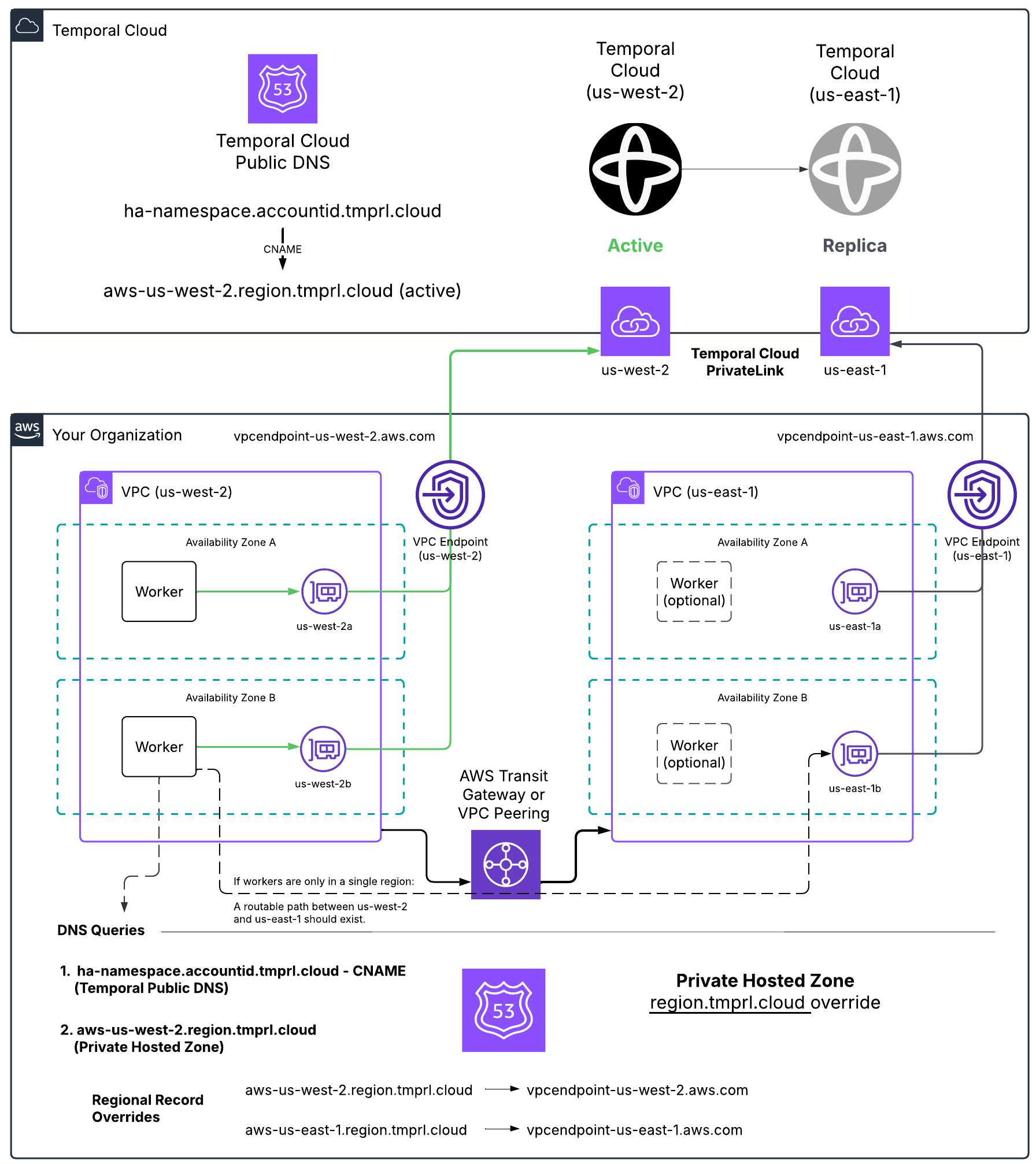
Customer side solution example
How to set up the DNS override
In AWS, use a Route 53 private hosted zone for region.tmprl.cloud to override resolution per region:
| Record name | Record type | Value (your VPC Endpoint DNS) |
|---|---|---|
aws-us-west-2.region.tmprl.cloud | CNAME | vpce-...-us-west-2.vpce.amazonaws.com |
aws-us-east-1.region.tmprl.cloud | CNAME | vpce-...-us-east-1.vpce.amazonaws.com |
Link the private zone to every VPC where Workers run.
When your Workers connect to the Namespace, they first resolve <ns>.<account>.tmprl.cloud, which CNAMEs to aws-<active-region>.region.tmprl.cloud, which then resolves to your local VPC Endpoint.
You also need to decide how Workers reach whichever region becomes active. Either:
- Run Workers in both regions continuously (recommended), or
- Establish cross-region connectivity (Transit Gateway, VPC Peering) so Workers in one region can reach the VPC Endpoint in the other.
Single-cloud HA on GCP Private Service Connect
Automatic failover through Temporal Cloud DNS is not supported with GCP Private Service Connect. GCP Cloud DNS cannot combine the public Namespace CNAME with private regional DNS overrides in the way the AWS pattern requires. Creating a PSC endpoint and a regional DNS override in each GCP region does not make Workers or Clients follow the active region automatically.
To reconnect through PSC after failover, manually update your private DNS override or Worker and Client endpoint configuration to use the active region's PSC endpoint. Create a PSC endpoint in each replica region and ensure your Workers and Clients can reach the endpoint they will use after failover. See the GCP PSC limitations and setup instructions.
A Connectivity Rule is required for each PSC connection — see GCP PSC setup and Connectivity Rules.
Multi-cloud HA (AWS PrivateLink + GCP Private Service Connect)
If your replicas span clouds — for example, AWS us-east-1 (active) and GCP us-east4 (passive) — your Workers need a way to reach the active replica regardless of which cloud it's in.
The GCP PSC DNS limitation above also applies to multi-cloud HA. Regional DNS overrides in GCP do not provide automatic failover to an AWS replica.
For GCP-resident Workers and Clients that use PSC, plan how they will reach an AWS replica:
- Use public connectivity after failover. Remove the private DNS override that directs the Namespace Endpoint to PSC so the endpoint resolves through public DNS. Allow public egress from your Workers and Clients, and attach a public Connectivity Rule to the Namespace. If you configured Clients to use the PSC IP address directly, change them to use the Namespace Endpoint as well. To avoid this manual connectivity change during failover, use public connectivity in both clouds from the start.
- Provide your own private network path. Temporal Cloud does not provide a GCP PSC endpoint for an AWS-hosted replica. To reach it privately from GCP, provide network connectivity to an AWS VPC with an AWS PrivateLink endpoint, and configure DNS or Clients to use that endpoint. Private network connectivity alone does not remove the GCP DNS limitation.
- Run Worker fleets in both clouds. Configure each fleet to reach its local replica through the appropriate private endpoint. See Worker architecture patterns for forwarding and failover behavior. Clients also need a working connection to a replica.
GCP Private Service Connect endpoints return only A (IPv4) records — there is no AAAA (IPv6) record. Most Linux distributions handle a missing AAAA gracefully, but Alpine Linux's musl resolver returns a SERVFAIL when AAAA is missing, which can cause Temporal SDK clients to fail name resolution after a failover from AWS to GCP.
If you run Workers on Alpine and use multi-cloud HA, either:
- Switch the Worker base image to a glibc-based distribution (Debian, Ubuntu, distroless), or
- Configure your application/runtime to disable AAAA lookups (for example, set
GODEBUG=netdns=go+v4for Go, or prefer IPv4 in the Java/Node/Python runtimes you use).
Available regions, PrivateLink endpoints, and DNS record overrides
The sa-east-1 region is not yet available for use with Multi-region Namespaces. Currently, it is the only region on the continent.
The cloud-specific connectivity pages list the available Temporal regions and the DNS record overrides used for High Availability and private connectivity. GCP regional DNS record overrides do not enable automatic failover with PSC.
AWS regions and PrivateLink endpoints
See Available AWS regions, PrivateLink endpoints, and DNS record overrides.
GCP regions and Private Service Connect endpoints
See Available GCP regions, PSC endpoints, and DNS record overrides.
When using a Namespace with High Availability features, the Namespace's DNS record <ns>.<account>.tmprl.cloud points to a regional DNS record in the format <provider>-<region>.region.tmprl.cloud, where <provider>-<region> is the currently active region for your Namespace.
During failover, Temporal Cloud changes the target of the Namespace DNS record from one region to another. Namespace DNS records are configured with a 15-second TTL. Any DNS cache should re-resolve the record within this time. For public connectivity and correctly configured AWS PrivateLink, receiving an updated DNS record takes about twice (2x) the TTL — clients should converge to the newly targeted region within, at most, a 30-second delay, assuming their resolver and language runtime honor the TTL. This DNS-based failover behavior does not apply to GCP PSC connections.